The Sims 2 - Part IV
by OldGamesCracking
Game Specs
| Name | The Sims 2 |
|---|---|
| Release-Date | 9/2004 |
| Redump ID | 49162 |
| Protection | SafeDisc v3.20.020 |
| Cracked under | Win XP |
| Tested under | Win XP & Win 10 |
| Scene-Crack by | MONEY |
Needed Tools:
- Good Old PC (Windows XP)
- x32dbg
- Ghidra
- ProcMon
- The original Game-CD of course ;)
- Compiler, Dev-IDE and stuff (e.g. VisualStudio)
- The previous articles on SafeDisc
- Koffeinhaltige Kaltgetränke
Disclaimer
- The games are cracked for educational purpose and to regain compatibility with modern systems
- The games are more than 20 years old and can be found freely on the net via e.g. archive.org
- No parts of the game are distributed
Recap
In the last article we explored Nanomites and wrote two first DLLs that will help us to fix the Nanomites. The question we left off with was how we can search and find all Nanomites and the other SafeDisc related stuff within the game code. In this article I will explain how I further evolved the DLLs.
Setup
The two DLLs that I showed in the last article are clearly a good starting point but they lack one feature: We don’t have much control over the game.
Let’s change that first.
In order to find a good spot where we can take control over the game, I decided it would be fun to gain control exactly at the OEP. To do so, you simply figure out the address of the OEP - which we already did in Part I - place an INT3 there (once the game is decrypted) and then let the game raise an exception which will instantly call our hook to WaitForDebugEvent. From there we can decide what to do next.
Installing the INT3 at the OEP is quite easy and that’s what I did in some of my previous articles and since the SafeDisc code did not change since then, we can use the dll_game.dll from the Stronghold Crusader article.
By the way, I store the byte that is replaced with the INT3 at the entry point of the game.exe (the initial one, not the OEP) as I can figure out this address in the worker by simply reading the PE headers. There are probably other methods to break at the OEP like hardware- or memory-breakpoints or removing the PAGE_EXECUTE flag from the protection attributes of the text section so an exception is raised which we can catch, but the method works well and I was too lazy to implement something else.
So, in short the process now works as follows:
- Inject dll_game.dll into game.exe
- Inject dll_worker.dll into debugger.exe
- In the game, figure out the OEP and wait for VirtualProtect to be called with an address-range that contains the OEP and flNewProtect=PAGE_EXECUTE_READ.
Then replace the byte at the OEP with an
INT3and place the original byte at OptionalHeader.AddressOfEntryPoint.*(BYTE*)OptionalHeader.AddressOfEntryPoint = *(BYTE*)OEP; *(BYTE*)OEP = 0xCC; - In the worker, also figure out the OEP, hook WaitForDebugEvent and check if “dwDebugEventCode==EXCEPTION_DEBUG_EVENT && ExceptionAddress==OEP”.
From there on we can start to repair the game.
Walking the code
Spoiler: The final DLL can be found here.
In order to find the Nanomites now, we need a better solution than just searching the text section for some random byte values of 0xCC (INT3), we actually want to be sure that we are really dealing with an INT3 instruction. The only good way to do so is to fully parse the instructions, e.g. via Zydis or Capstone. I opted to go with Zydis as this is what x64dbg uses and so I can get some inspiration (although I have to mention that it used Capstone up until 2017).
Fully parsing the instructions gives us another few benefits. First, we can quite easily find all the other SafeDisc related stuff as it leaves some identifyable traces. Second, we can make sure that the reconstruction is done roughly in the same order as the CPU would run the game - we will see in a short moment why this matters. And last but not least, we can print out the parsed instructions to get a very nice debug output for every single line of code if we need it.
My setup works as follows: I have two buffers that have the same size as the text section of the game. The first one is actually a 1:1 copy of the text section so I can perform the code parsing/walking/exploration locally (keep in mind that the parser runs inside the debugger.exe, not the game.exe). The second buffer is a flag-array in which I store a few flags for every single byte in the text section like “EXPLORED” (have I parsed this byte already?), “IGNORED”/“FILLING” or “START_OF_FUNCTION” (is this the first byte of a ‘function’?) and a few others.
In the CodeExplorer.cpp I will do the exploring of the code from within the Explore function by first getting a start-address from the NextVAToExplore function and then parsing the code from there. The start-address comes from an ‘open’-list which is initially filled with known entry points (OEP, Exports) and which is later filled with found branches/calls etc. In total, nine - increasingly desperate - methods are used to find start-addresses from which the code can be parsed.
If anything unusual or interesting is found, the Explore function returns with a corresponding status code. Depending on that status code, further actions are performed. The important status codes are:
- CallInterSection: A
CALLwas found that stays within the text section. This can be an entry point to some SafeDisc stuff. But most likely is just a normal subroutine call. - IndirectBranchFromMemory: Usually these are intermodular calls, check if they are proxied through a stub as we discussed in Part 2.
- UnusualCode: Probably a Nanomite, as discussed in Part 3.
- InvalidCode: Previous SafeDisc versions used other instructions then
INT3for Nanomites, not used in this game. - JumpOutOfTextSection: Probably also some SafeDisc stuff that is proxied through temporary buffers.
- IATCallByRegister: Pretty much the same as IndirectBranchFromMemory but the address is not directly jumped/called, only loaded in a register.
I can not explain the code to the very last detail here, but I want to point out one detail. Remember when I said, that one can restore Nanomites by spawning a new thread on them? This idea was presented in w4kfu’s Article and it sounds easy at first but managing the program flow is rather complicated, especially if anything goes wrong. I opted to go with a simpler aproach. I just hook WaitForDebugEvent and fake the response, so SafeDisc thinks the game stumbled upon a Nanomite, but in reality it never gets past the OEP.
BOOL __stdcall Callback_WaitForDebugEvent(LPDEBUG_EVENT lpDebugEvent, DWORD dwMilliseconds)
{
    // Figure out address of next Nanomite

    lpDebugEvent->dwDebugEventCode = EXCEPTION_DEBUG_EVENT;
    lpDebugEvent->u.Exception.dwFirstChance = 1;
    lpDebugEvent->u.Exception.ExceptionRecord.ExceptionAddress = (PVOID)worker.EventAddress; // Address of Nanomite
    lpDebugEvent->u.Exception.ExceptionRecord.ExceptionCode = EXCEPTION_BREAKPOINT;
    lpDebugEvent->u.Exception.ExceptionRecord.ExceptionFlags = 0;
    lpDebugEvent->u.Exception.ExceptionRecord.NumberParameters = 0;

    return TRUE;
}
This simplifies the program flow a lot.
Time to Let It Rip!
Now that I had a nice setup, I let the DLL crawl through the game code and had a look through the log-file. Eventually I found this bit at 0x00C7E62E:
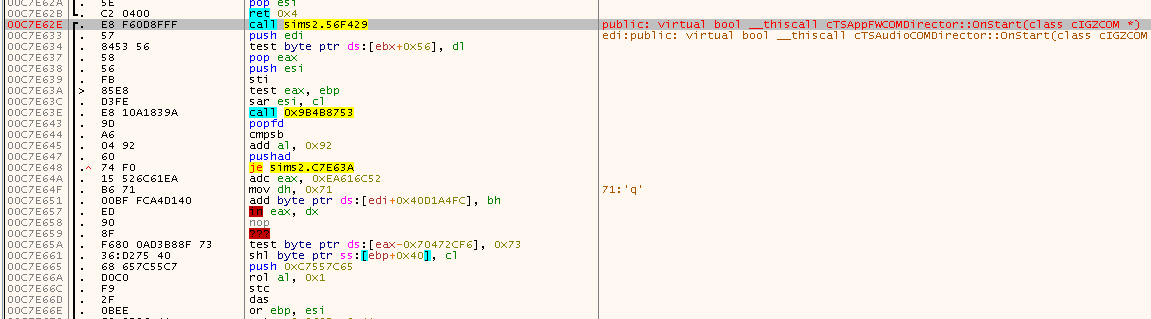
At first it doesen’t look too weird. Just some CALL, followed by a few instructions, nothing special. But a few instructions down the line some weird stuff starts to show up, also upon closer inspections, the instructions don’t make too much sense. Moreover, this function at 0x00C7E62E is a named export virtual bool __thiscall cTSCommonCOMDirector::OnStart(class cIGZCOM *) (demangled by x64dbg), so we would expect some more meaningful code here. Looks like there is probably some trickery going on.
If we follow the CALL, we land in a very small function, that is probably just some setup function and was - by the looks of it - placed in a code cave between two real functions:

Following the CALL again, we land in another code cave:

And if we once more follow the JMP we land in a setup routine in the ~df394b.dll we saw before:
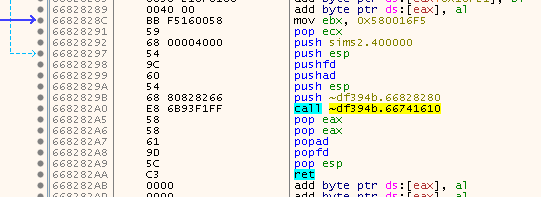
So yes, that is definitely some SafeDisc related stuff. But what is it doing? Let’s use the good old “Breakpoint on PUSHFD” trick and see where we land. We break here:

Looks like the values on the stack get shuffled around, so nothing special. Hit F9 and break again a few lines below:

Again some shuffling, so hit F9 one more time.

This time it looks like we have reached the end of the SafeDisc routines and we can finally step out. So do that and have a look where we landed:
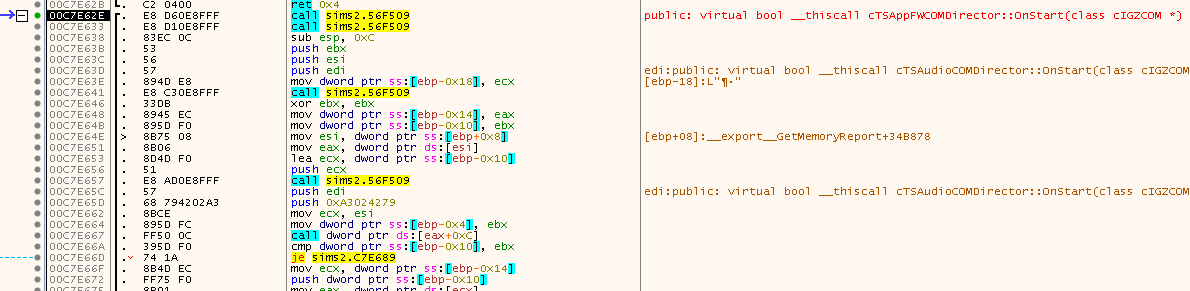
See that? We are back at the same address we came from, but this time the code looks completely different. So looks like the code is self-decrypting. That’s why it’s important to explore the code ‘consciously’. If we would have explored the code linearely, we would have ran into the decrypted code.
Luckily the code will stay decrypted, there are no self-re-encrypting functions as in GTA III.
Interestingly, if you have a closer look at the code, it looks much better now, but still kinda weird:
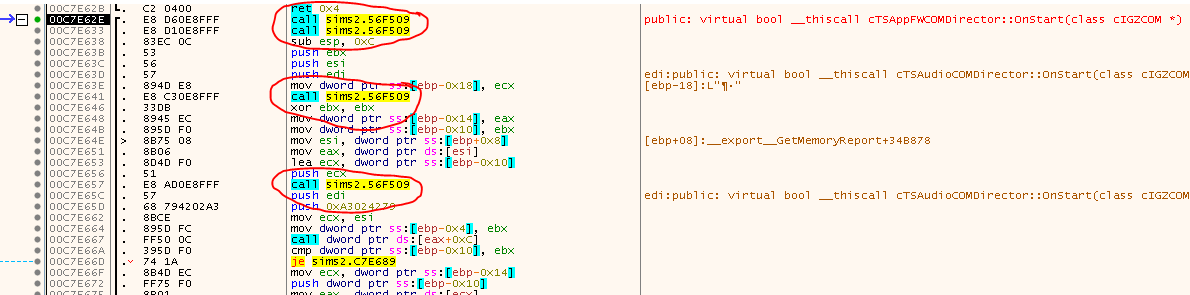
Why are there all these Calls? They have no parameters and they also seem to return nothing. If you step into them, you will find a very familar setup: Two stubs in code caves and then the famous setup code (PUSHFD, PUSHAD, …). So, again. There is clearly some trickery going on. But what is it this time? Go ahead, try the “Breakpoint on PUSHFD” method again and see where you land. You should land at seemingly random places in the game code. Sometimes you just land on the next instruction. Sometimes you land in a completely different function.
Up until this point, fixing the game was quite easy since no new methods - compared to previous versions of SafeDisc - were used, but oh boy, this one was tough. I’ll uncover all it’s secrets in Part 5. Fasten your seatbelts. It’s going to be a bumpy ride.
tags: The Sims 2 - Game Cracking - Reverse Engineering - SafeDisc - Tooling - Zydis - Disassembler - DLL Injection - Self Debugging