Stealth Combat
by OldGamesCracking
Game Specs
| Name | Stealth Combat |
|---|---|
| Release-Date | 02/2002 |
| Redump ID | 128068 |
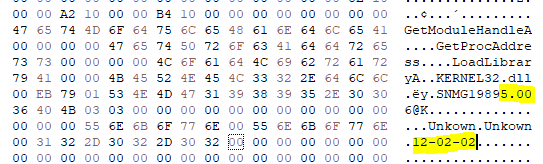
| Protection | Laserlock v5 (Build 12.02.02) |
| Cracked under | Win 10 |
| Tested under | Win 10 |
| Scene-Crack by | FAIRLIGHT |
Needed Tools:
- x32dbg
- The original Game-CD of course ;)
Disclaimer
- The games are cracked for educational purpose and to regain compatibility with modern systems
- The games are more than 20 years old and can be found freely on the net via e.g. archive.org
- No parts of the game are distributed
Intro
I wanted to do a crack of a Laserlock protected game for some while, but I couldn’t find any that ran on my PC or in the VM. Afer spending a few bucks on eBay I finally came across this one. In runs fine on my Win 10 machine and so I could crack it there.
Finding out if a game is protected with Laserlock is super trivial. You just have to look if there is a (hidden) folder on the disc named “Laserlok”. Note that for whatever reason, Laserlock is also called Laserlok (without the C). Figuring out the version on the other hand is not so trivial. BinaryObjectScanner reports a version of 95, but that does seems to be wrong. ProtectionID reports a version of v5 which is more likely. In the end it seems to boil down to these strings within the game.exe:
How to crack
The game does not seem to have a debugger detection per se but nevertheless, it has some features that makes debugging quite hard, at least if you try to understand some internals.
But for a fast start, let’s keep it simple and as always, start up x64dbg and Procmon and have a look around. We see that a temporary file called NIL32.dll is created and later this file is loaded as a DLL (LoadLibrary).
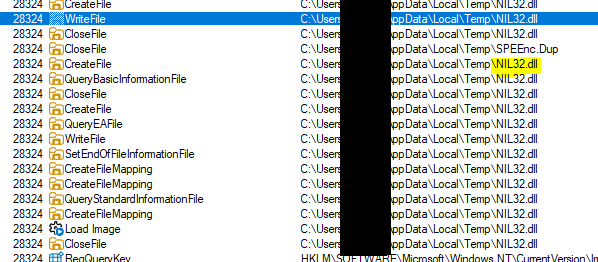
This is probably part of the protection, especially since this DLL is later unloaded (FreeLibrary) and is not present when the game runs.
Also, judging by how the code looks (lots of garbage data and many misleading JMPs) we get the feeling that the game is is packed/protected in some way. Time to find the OEP ;)
One of the first things I like to try is to place a breakpoint on GetVersion as this is used very early on in many programs. For that, just type “bp GetVersion” into the command field and let the program run freely. Make sure to pass all exceptions as the protection seems to rely on exceptions to change the control flow. After a few false hits, we end up on this call in the sub that starts at 0x503258:
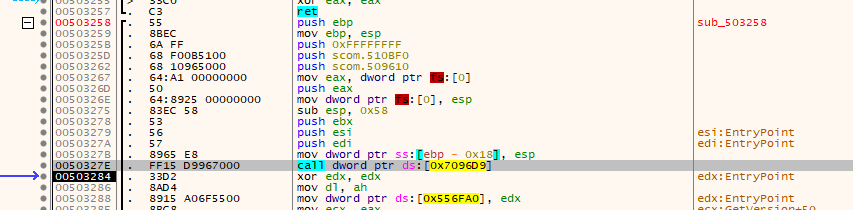
This looks familiar, we have very likely found the OEP to be located at 0x503258!
To prove my theory that this really is the OEP, I tried to place a hardware breakpoint on the address, but it never triggered. Laserlock seems to clear the breakpoints in it’s exception handlers. After playing a bit with the options in Scylla Hide, I found out that you have to tick these two options in order to make the hardware breakpoints persistens:
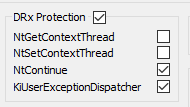
With that, the breakpoint finally works and we break nicely at the OEP ;)
If you have a look at the stack now, you can see that the last value that was pushed on the stack is indeed the address of the OEP, so the OEP was most probably reached via a classical “PUSH address; RET”-combination.

Bonus points: Finding the tail jump
If you are just interested in dumping the game, you can skip this paragraph as we have already everything we need, but finding the tail jump is always a good idea to really prove that you are at the OEP and maybe this gives you the opportunity to make the unpacking process a bit more consistent.
As I’ve already said, the game makes heavy use of exception handlers to change the control flow, moreover it seems to perform checksum-checks at various locations. So if you are playing along at home and your game hangs for no reason and the “Events per second” counter of x64dbg is going crazy, you have probably placed an INT3 breakpoint somewhere that messed up the checksum calculations.
Placing a breakpoint in library functions on the other hand is possible and so that’s what I used in order to get closer and closer to the tail jump. I started with FreeLibrary since I knew that the NIL32.dll file gets unloaded somewhere within the unpacking process. From there on, I single-stepped through the JMP-hell and whenever I came across a CALL to a libray, I wrote down the name of the library. I stepped through the code until I landed on an instruction that would raise an error, e.g.:

I then had a look at the currently installed SEH handler and placed a breakpoint on the entry point of the handler. With the help of the following script I made my way back to user-code (run this at the entry point of the handler):
; Remove breakpoint on the entry point of the handler
bpc eip
; Get address of EIP within CONTEXT block
$eip_ctx_addr = dword:[esp+0x0c] + 0xb8
; Breakpoint on return address
$ret_addr = dword:[esp]
bp $ret_addr
run
bpc $ret_addr
; Find out the address of the altered EIP
$eip_new = dword:[$eip_ctx_addr]
; Break there
bp $eip_new
run
bpc $eip_new
I then proceeded to single-step through the code and write down library CALLs. These calls give you the option to fast-forward a bit. So instead of breaking on FreeLibrary, you can - for example - break on LocalAlloc or LoadLibraryA which are called later down the road. I figured out that the last calls go to a bunch of CloseHandle and then a LocalFree. After that, you can single-step a few times and you land on this bit:

Having a look at the top value on the stack reveals that this is indeed the tail jump and that 0x503258 really is the OEP ;)
By the way, one could have also guessed right away that these procs (CloseHandle, LocalFree, …) would be called as they are frequently used in the last part of typical loaders as they are used in the import reconstruction process.
Fixing the imports
While I stepped through the loader code, I accidently stumbled upon the part of the loader that performs the importing of the remote procs. It’s super simple and once you know where to look, reconstructing the imports becomes a piece of cake!
I realized that when the game code is unpacked/decrypted and written to the text-section, the Calls point to some invalid address:
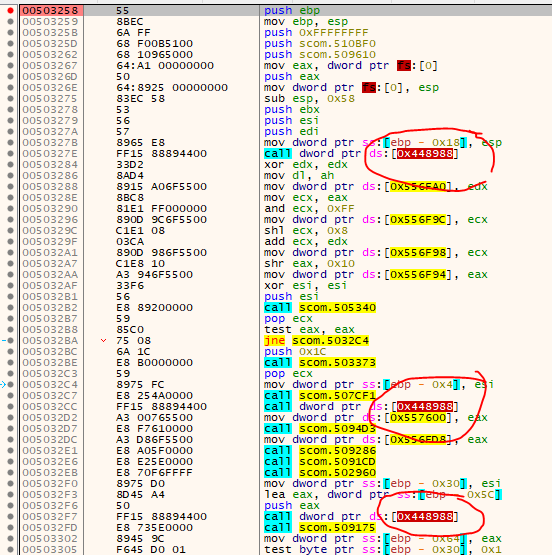
But once we reach the OEP, the addresses have been replaced with the real address of the stub:
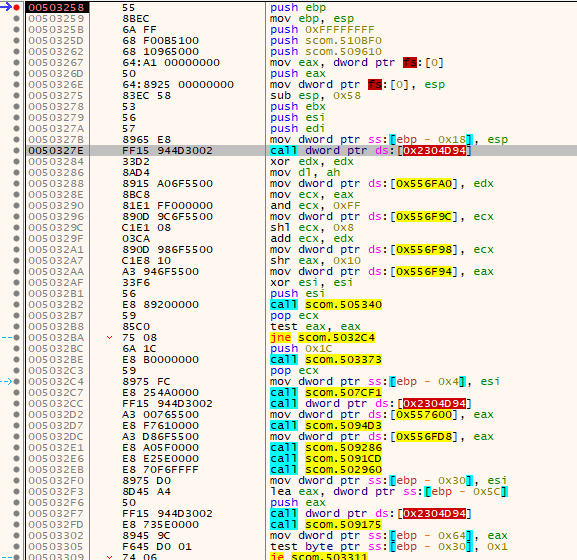
So I placed a hardware breakpoint on the address of the first call (0x503280) to see where this gets overwritten and landed here:

This code goes through a list that contains two values per entry. The first value is the Virtual Address of the return address - hence, subtracting 5 from that gives the address of the call. The second value is the original thunk address. Something like that:
struct Call
{
    DWORD va_return;
    DWORD va_thunk;
};

struct Calls
{
    DWORD num_calls;
    struct Call calls[NUM_CALLS];
};
This makes it super easy to reconstruct the calls, we just need to figure out where the Calls struct is located.
Luckily the stub yields the address of the Call-list within the first few instructions:
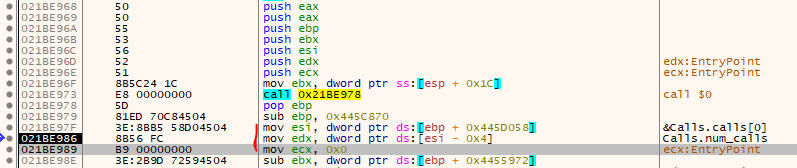
So, if you have the address of the stub, add 0x10 (Return-Address of the CALL we see in the image above), then subtract 0x445C870, add 0x445D058 and then dereference that address. Unfortunately, the stub and Calls-list are located in dynamically allocated memory and chage every time you re-start the game.
$stub_address = 0x21BE968

$calls_address = dword:[$stub_address + 0x10 - 0x445C870 + 0x445D058]
$num_calls = dword:[$calls_address - 4]
Fixing the calls then becomes easy, just loop through the list and place the original thunk-addresses at the given Call-addresses.
But there is one Gotcha!
Have a look at the list:
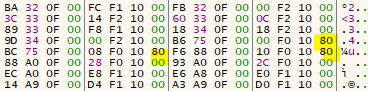
Some of the entries have a thunk-address that is unusually high. If you have a closer look at the Laserlock-stub, you realize that the MSB is actually a flag that will be masked out later (AND 0x7fffffff). This flag indicates that a “JMP [address]” (FF 25) shall be perfomed instead of a “CALL [address]” (FF 15).
The script I used to reconstruct the imports can be found here.
But if you try to dump the game now, Scylla still reports one broken import:

Up on closer inspection, you realize that this is some strange wrapper for GetProcAddress which one can already guess by the surrounding code:

Luckily we can adjust that in Scylla manually.
With that out of the way, we can finally dump the game. As far as I can tell there are no additional CD checks and the dumped game will run without the CD.
tags: Stealth Combat - Game Cracking - Reverse Engineering - Laserlock - Laserlok