4x4 Evo
by OldGamesCracking
Game Specs
| Name | 4x4 Evo |
|---|---|
| Release-Date | 10/2001 |
| Redump ID | 48359 |
| Protection | CopyLok / CodeLok v2.20 |
| Cracked under | Win 10 |
| Tested under | Win 10 |
| Scene-Crack by | RAZOR1911 |
Needed Tools:
- x32dbg
- The original Game-CD of course ;)
- (DxWnd)
- (Python)
Disclaimer
- The games are cracked for educational purpose and to regain compatibility with modern systems
- The games are more than 20 years old and can be found freely on the net via e.g. archive.org
- No parts of the game are distributed
Intro
This game runs on my Win 10 machine, but it takes ages to boot up and once it runs the graphics are messed up and you could not really call this playable. I figured out that DxWnd works quite well for this game. Still, it takes ages to boot (I have no idea why), but once it runs, everything looks fine, so if you’re having problems, try using DxWnd.
How to Crack
At first, I did not find a way to figure out the exact version of CopyLok / CodeLok - which by the way must not be confused with CodeLock (Code-Lock) or Copylock - but the last archived website of the manufacturer is from 2004 which names a date of March 2001, since then no new News were reported, so I’m guessing that there are not many different versions around, especially none that are newer than the version on this game.
So let’s open the game in x64dbg and have a look around. Interestingly the debugger is not detected. If you install a breakpoint at CreateFileW you will see the classic MeltICE trick, but since we use a different debugger, that’s none of our concern. Also it tries to create a file called A:\CL.LOG.
A sidemission
Ok, the file A:\CL.LOG caught my attention. Drive letter A is somewhat uncommon these days. It was typically used for the first floppy disk drive.
Sidenote: In the early days it was common to have a second floppy disk drive (drive letter B), later, when a computer also had a hard disc drive it was assigned to drive letter C and that’s what we still use today.
The file needs to be present (dwCreationDisposition=OPEN_EXISTING) and if not, it will not be created automatically. So as a first step, I manually changed the path so that it points to a non-system drive that needs no admin rights (like D:\), later I discovered that one can just use a USB drive and re-assign the drive letter to A which might be easier if you do not have a second hard drive. If the file is present, the game will log some (encrypted) binary data to it.
Ok, time to dig a bit deeper.
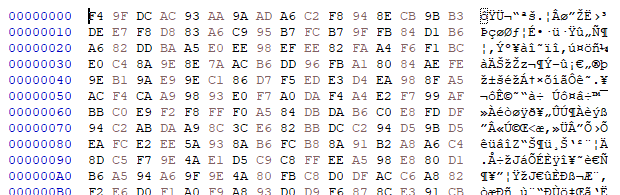
It didn’t took me too long to figure out, that the content that gets written to the file are really some log-messages as the name implies. The encryption is done in two stages. First, the message is obfuscated by replacing all alpha-chars with a ‘rotated’ version. A bit like the good old Caesar cipher but the rotation is changed for each letter. Every other char that is non-alpha stays the same. In a second step, the message is then encrypted by XORing each char with a round-key. Actually, both steps calculate the key/rotation in the same fashion.
The encrypted messages are then written to the file (with no additional headers/markers).
In order to parse and decrypt the file, one first needs to figure out the length of each original message (since the length is part of the key). In theory this would not be possible since the file does not contain additional markers, but luckily the original messages are all terminated by a Carriage Return (\n) and during encryption, all MSBs are set to 1 (OR 0x80) except for when a Carriage Return is detected. In this case, the MSB is cleared (AND 0x7f).
This means that we can find the end of each string by checking the MSB for a 0.
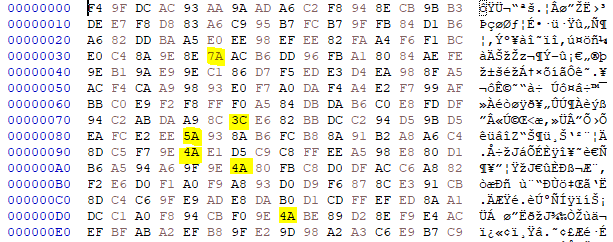
With that out of the way, we can parse the logfile, decrypt and de-obfuscate it and have a look at what gets logged:
PROC GetCommandLineA 6 ff 25 a0 16 e6 76 cc cc cc cc
MSTART = Sun Feb 01 17:11:01 2026 Command line not logged yet!!
Version=2.10
mjd = ADB0B985
OS 6 2 23f0 2 []
PROC MessageBoxA 0 8b ff 55 8b ec 83 3d b4 6c 62
PROC GetDriveTypeA 6 ff 25 d0 11 e6 76 cc cc cc cc
PROC GetLogicalDriveStringsA 0 8b ff 55 8b ec 83 ec 14 53 56
...
SPTI inferface loaded OK
CDROM [E]
No CD modes work
CDROM [I]
0 ReadCDAspiC OK
Read Sector 16 using 0
RN 7040 (0) time=149
...
PROC SetDebugErrorLevel 3 c2 04 00 cc cc cc cc cc cc cc
...
RSTART = Sun Feb 01 17:11:07 2026
...
PROC DirectDrawCreate 0 8b ff 55 8b ec 81 ec 14 01 00
PROC <> 0 77 73 32 5f 33 32 2e 73 68 75
...
GSTART = Sun Feb 01 17:11:09 2026
This is interesting. First, it is easy to see that the first 10 bytes from some procs (like MessageBoxA, GetDriveTypeA, GetLogicalDriveStringsA, …) are logged and there are two more values that caught my attention. Namely mjd and Version.
Both values are read from an encrypted part of the .idata section. I did not bother to reverse engineer the decryption routine as we can just use the logfile. I then downloaded a few ISOs of games that are also protected with CopyLok just to see if the logfile-trick also works. Note that the logfile is created even if the CD-Check fails.
This are the results:
| Game | Sudden Strike |
|---|---|
| Release | 10/2000 |
| Version | 2.08 |
| mjd | B6E4AECC |
| Logfile | A:\CL.LOG |
| Game | Motocross Mania |
|---|---|
| Release | 11/2000 |
| Version | 2.10 |
| mjd | 998B2A2F |
| Logfile | A:\CL.LOG |
| Game | Cossacks: European Wars |
|---|---|
| Release | 11/2000 |
| Version | 2.20 |
| mjd | BC791175 |
| Logfile | C:\icd\asd.dat |
So, it looks like the mjd value is game-specific, maybe some key or just a game-identifier. The Version value might actually be the CopyLok-Version we were looking for. I have written a Python-Script to decrypt the contents of the logfile.
Back on track
As discussed earlier, the game does not seem to detect the debugger (asides from SoftICE), but still it seems to use exceptions to delete hardware breakpoints and it also verifies the code at various points, so using breakpoints is kinda complicated. Moreover it seems that it checks the entry point of various library functions, so when you want to place a breakpoint there, make sure to place it a few instructions deep into the function.
Besides all that, the game itself does not seem to use the ‘classic’ stuff around the OEP (GetVersion, GetCommandLine, …) or at least it does that in some nested functions, so it took me some while to figure out a good method to find the tail jump.
Sidenote: The reason why my breakpoints did not trigger might have also been the stolen bytes in the import-stubs (more on that later).
After trying a few common functions, I ended up using good old GetProcAddress and waited for it to load “ws2_32.WSAGetLastError” which seems to be the last import it reconstructs. Once that’s done, step out and hit “step over” a few times. It takes a moment, but ultimately you should arrive here:
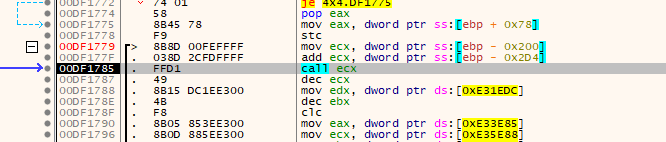
Yay, we have made it to the tail-jump! Single step into the CALL and you are at the OEP (although the code may not look like it).
When we try to dump the game now, we have some invalid imports. Having a short look reveals that some thunks point to temporary buffers. They look like the following:

So, a few random instructions and then a JMP to the original proc.
For reference, the original proc looks like the following:

See that? The first two instructions were ‘stolen’ from the original function and placed in the temp buffer. In this example the first 2 instructions (7 bytes) were ‘stolen’. Following the two instructions a jump was installed that jumps back to the third instruction in the original proc (at 0x755A8777).
This is probably the reason why a breakpoint on the original function does not trigger, as it is never executed.
Luckily for us, this is easiy repairable via script:
- Go through the IAT and check for thunks that point to a temporary buffer.
- Go through the buffer and parse the instructions to find the last instructions (the JMP). Count the number of bytes until there.
- From the last instruction (the JMP), take the destination address and subtract the number of bytes of the preceeding instructions.
- You should have the address of the proc now.
After the imports are fixed we are good to go. There are no additional checks ;)
You can find the script here
tags: 4x4 Evo - Game Cracking - Reverse Engineering - CodeLok - CopyLok